

If you’ve built more than one upload feature in React, you’ve probably hit the same wall twice: it works fine for a single file, and then it falls apart the moment someone drags in ten files at once. Progress bars freeze. A cancelled upload keeps updating a component that no longer needs it. One failed file causes the whole list to re-render three times a second.
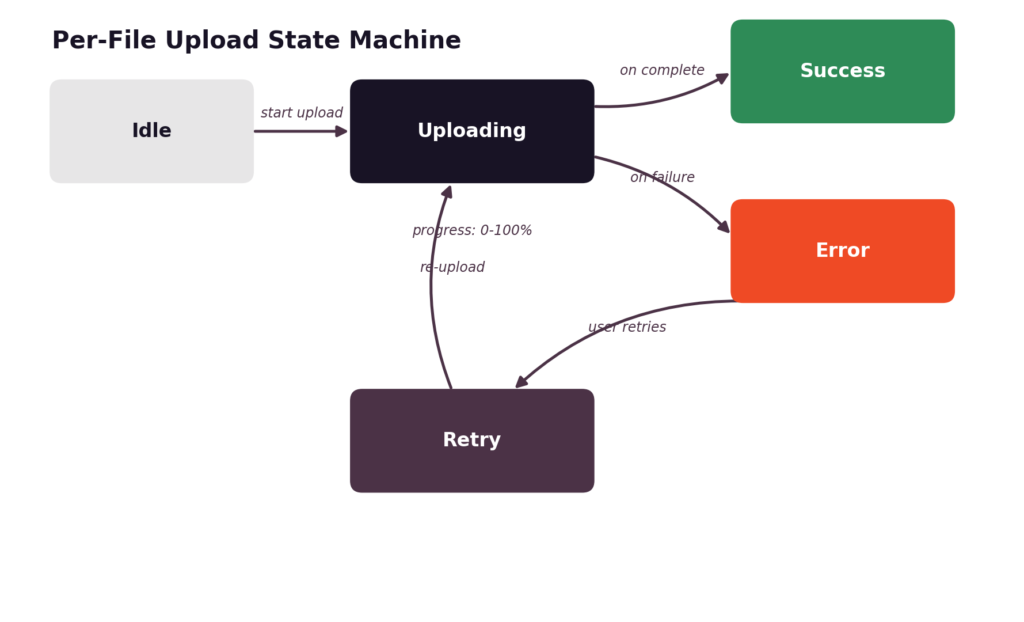
None of this is really about file uploads. It’s about state, specifically, how many small, independent, asynchronous pieces of state you’re trying to track at once, and how loosely most of us model that state when we’re moving fast. A file upload has a lifecycle: it starts idle, moves to uploading, and ends in either success or error, sometimes looping back through a retry. Multiply that by however many files a user selects, and you have a small distributed system living inside a single component.
This piece walks through a cleaner way to think about that lifecycle: modeling it explicitly, keeping progress updates from wrecking your render performance, structuring the code so upload logic doesn’t leak into your UI, and where it’s reasonable to stop building the plumbing yourself and lean on tooling like the React file upload SDK for the parts that don’t need to be reinvented.
Key Takeaways
- Treat every file as its own state machine: idle, uploading, success, error, retry, instead of a loose bag of booleans.
- Normalise multi-file state into a keyed collection so updates to one file don’t touch the others.
- Throttle or batch progress updates; raw onProgress events fire far more often than a UI needs to repaint.
- Keep upload logic in a hook and UI components purely presentational, so each part is easy to test and reason about.
- Offload chunking, retries, and resumable uploads to an SDK once your own state layer is solid; it’s not worth hand-rolling.
Why Upload State Gets Messy in React
Upload state is deceptively simple to describe and genuinely hard to keep tidy once real usage patterns show up. Here’s where most implementations start to crack.
The Core Difficulty
A single file upload is easy to model: you’re either waiting, uploading, done, or failed. The trouble starts when a user picks several files at once, because now you’re tracking several of those lifecycles in parallel, each on its own timeline.
- Many files, independent states: File A might succeed while File B is still uploading and File C has already failed. Your state needs to represent all three simultaneously without one bleeding into another.
- Progress, errors, and cancellation, all at once: Each file carries its own progress percentage, its own possible error message, and its own cancel handle. That’s a lot of per-item detail to keep synchronised with the UI.
- Re-renders during active uploads: Progress events can fire dozens of times per second per file. If your state update pattern isn’t careful, you’ll re-render the entire upload list on every tick, even for files that aren’t changing.
What Clean State Looks Like
The fix isn’t a clever library; it’s a clearer mental model, applied consistently.
- A clear model per file: Every file object should carry its own status, progress, error, and any metadata it needs, independent of the others.
- Predictable status transitions: A file should only be able to move through a known set of states, in a known set of directions. No silent jumps from “uploading” straight to some undefined limbo.
- Isolated, testable logic: If your upload logic lives outside your components, you can test state transitions with plain function calls, no rendering required.
Once that model is in place, the rest of the implementation gets a lot less fragile, which is exactly what the next section is about.
Modeling Upload State
With the problem framed, the next step is deciding what shape that state should actually take in code.
A Per-File State Machine
Thinking of each file as a small state machine keeps the logic honest. There are a limited number of states, and a limited number of valid transitions between them:
- Idle: The file is selected but hasn’t started uploading.
- Uploading: The request is in flight, and progress is updating.
- Success: The upload completed and you have a response (a URL, an ID, whatever your backend returns).
- Error: The request failed, with a reason attached.
- Retry: A deliberate transition back into uploading, kicked off by the user or an automated retry policy.
Progress belongs inside this model too, not off in a separate piece of state. A file in the “uploading” state should carry its own progress field, so the two are never out of sync with each other.
For multiple files, the cleanest approach is a normalised collection: an object keyed by file ID rather than an array you have to search through:
const [files, setFiles] = useState({});
// files = {
// ‘file-1’: { name: ‘invoice.pdf’, status: ‘uploading’, progress: 42 },
// ‘file-2’: { name: ‘photo.png’, status: ‘success’, progress: 100 },
// }
Updating one file’s progress becomes a single, targeted update:
function updateFile(id, patch) {
setFiles((prev) => ({
…prev,
[id]: { …prev[id], …patch },
}));
}
This is the part that pays off almost immediately: a change to file-1 doesn’t touch the object reference for file-2, which matters a lot once you start optimising renders. Speaking of which, that’s where things get interesting once uploads are actually in motion.
Handling Progress and Cancellation
A state model is only half the story. The other half is what happens while an upload is actually running: progress ticking up, users changing their minds, and requests occasionally failing outright.
Interactive Uploads
Progress, cancellation, and retry are the three interactions users actually notice, so they’re worth getting right individually.
- Updating progress without thrashing renders: Most upload clients expose an onProgress callback tied to the underlying XMLHttpRequest or fetch stream. Wire that callback to updateFile(id, { progress }), but be deliberate about how often you actually let it update state (more on that in the next section).
- Cancelling in-flight uploads: Store an AbortController alongside each file’s state so you can call .abort() on demand:
function startUpload(file, id) {
const controller = new AbortController();
updateFile(id, { status: ‘uploading’, progress: 0, controller });
fetch(‘/upload’, {
method: ‘POST’,
body: file,
signal: controller.signal,
})
.then(() => updateFile(id, { status: ‘success’, progress: 100 }))
.catch((err) => {
if (err.name !== ‘AbortError’) {
updateFile(id, { status: ‘error’, error: err.message });
}
});
}
function cancelUpload(id, files) {
files[id]?.controller?.abort();
updateFile(id, { status: ‘idle’, progress: 0 });
}
- Retrying failed files individually: Because each file already tracks its own status and error, retrying is just re-running startUpload for that one ID rather than restarting the whole batch. Users notice this distinction quickly; nobody wants to re-upload nine successful files because the tenth one timed out.
Getting these three interactions right solves most of the “headaches” in the title. What’s left is mostly about keeping things fast once you’re running several of these at once.
Avoiding Performance Pitfalls
Correct state transitions don’t automatically mean a smooth UI. Progress events, in particular, can quietly overwhelm React’s rendering if you let them.
Keeping It Fast
A few habits go a long way here, and none of them requires a new dependency:
- Isolating the upload component: Give each file row its own component, memoised, so a progress update to one file doesn’t force a re-render of the entire list. This is standard React practice, but it matters more here because updates arrive so frequently.
- Debouncing progress updates: You don’t need to repaint the DOM for every 1% change. Throttling progress state updates to something like every 100–200ms (or every few percentage points) keeps the UI responsive without pretending users can perceive the difference between 47% and 48%.
- Memoising to prevent re-renders: Wrap file row components in React.memo, and make sure the props you pass down, callbacks especially, are stable references (useCallback) rather than freshly created functions on every parent render.
const FileRow = React.memo(function FileRow({ file, onCancel, onRetry }) {
return (
<div>
<span>{file.name}</span>
<progress value={file.progress} max={100} />
{file.status === ‘error’ && <button onClick={() => onRetry(file.id)}>Retry</button>}
{file.status === ‘uploading’ && <button onClick={() => onCancel(file.id)}>Cancel</button>}
</div>
);
});
None of this is exotic; it’s the same performance discipline you’d apply to any list with frequent updates. The difference is that upload lists tend to update more aggressively than most, so skipping these steps shows up faster. With performance handled, it’s worth stepping back and looking at how the pieces fit together as actual code, not just isolated snippets.
Structuring the Code
Once the state model and performance approach are settled, the last piece is making sure the logic doesn’t sprawl across your component tree over time.
Separation of Concerns
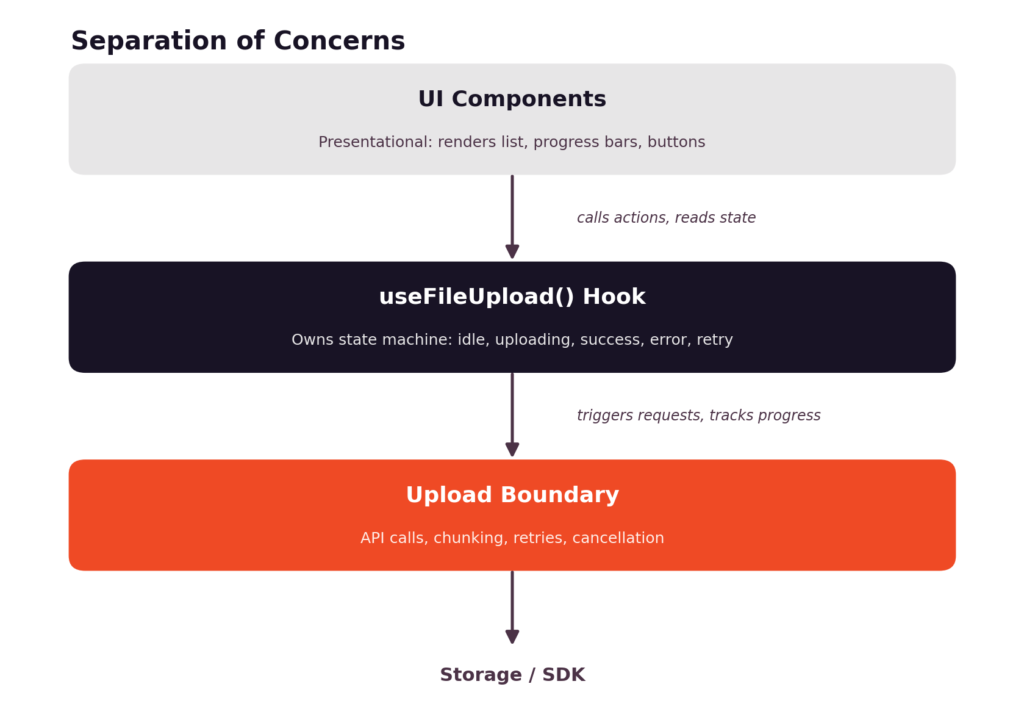
The pattern that holds up best in practice is a simple three-layer split:
- A hook for upload logic: Something like useFileUpload() should own the state machine, expose files, startUpload, cancelUpload, and retryUpload, and hide all the AbortController and fetch details from anything that consumes it.
- UI components kept presentational: Your <FileList>, <FileRow>, and progress bar components should only read props and call the handlers they’re given. They shouldn’t know anything about fetch, chunking, or retries.
- Backend calls behind a clear boundary: Whatever actually talks to your storage or API, raw fetch calls, a custom client, or an SDK, should sit behind a small interface the hook calls into, so swapping that layer later doesn’t mean rewriting your components.
function useFileUpload() {
const [files, setFiles] = useState({});
const updateFile = (id, patch) =>
setFiles((prev) => ({ …prev, [id]: { …prev[id], …patch } }));
const startUpload = (file) => {
const id = crypto.randomUUID();
updateFile(id, { name: file.name, status: ‘idle’, progress: 0 });
// upload boundary call goes here
return id;
};
return { files, startUpload };
}
This structure is what makes an upload feature maintainable six months later, when someone asks for a new file type restriction or a different retry policy, and you’d rather not touch five components to add it. It’s also the point where a reasonable question comes up: how much of this should you actually be building yourself?
How an SDK Simplifies This
Everything above is worth understanding regardless of what you use to actually move bytes to storage: the state model, the render discipline, and the code structure are all decisions you make in your own app. But the transport layer underneath it is a different kind of problem, and it’s usually not where custom code adds the most value.
Less State to Manage
Chunked uploads, resumable transfers, retry backoff, and progress reporting across flaky connections are the kind of thing that looks simple in a demo and gets complicated fast in production: different browsers, spotty networks, and large files all introduce edge cases that are easy to underestimate.
- Progress and retries handled for you: A file upload SDK typically exposes progress and retry hooks that plug directly into the state model described earlier, without you having to reimplement backoff logic or track partial upload state manually.
- Chunked, resumable uploads built in: Large files split automatically and can resume from where they left off after a dropped connection, instead of restarting from zero.
- A React-friendly integration surface: Filestack’s React SDK is built to slot into the hook-and-component structure covered above, so the state machine you’ve already designed doesn’t need to change; it just delegates the transport details instead of owning them.
The state model, the performance habits, and the code structure are yours to keep regardless of what handles the actual transport. Where you draw that line is a judgment call based on how much of this problem is specific to your product versus how much of it is just infrastructure every upload feature needs.
Conclusion
Most “messy upload state” problems trace back to the same root cause: treating a set of independent, asynchronous lifecycles as one big blob of state instead of modeling them individually.
Once each file has its own clear states, progress lives inside that model, and updates are isolated to the component that needs them, a lot of the flakiness disappears on its own. From there, it’s mostly performance hygiene, memoising, debouncing, and keeping upload logic out of your UI components.
What you build custom and what you hand off to an SDK is a separate decision, and it’s usually easiest to make once your own state layer is solid enough that swapping the transport underneath it doesn’t require touching anything else.
FAQs
What state should I track for each React file upload?
At minimum: a status (idle, uploading, success, error), a progress percentage, an error message when applicable, and a reference you can use to cancel the request, such as an AbortController.
Should I use useState or useReducer for uploads?
useState with a normalised object works fine for straightforward cases. If your transitions get more complex, multiple retry policies, queuing, concurrency limits, a useReducer with explicit action types makes the state machine easier to follow and test.
How do I update upload progress without excessive re-renders?
Isolate each file into its own memoised component, and throttle progress updates so you’re not triggering a state update on every single percentage tick.
How do I cancel and retry one file in React?
Store an AbortController per file so cancellation only affects that request. Retrying is just calling your upload function again for that file’s ID, since its state is already isolated from the rest of the batch.
How should I manage concurrent file uploads?
Cap the number of simultaneous uploads with a simple queue, and let each file in the queue run through the same state machine independently once it starts.
How do I prevent stale upload callbacks from changing state?
Check that the file is still in the expected state before applying an update, and make sure cancelled or replaced uploads don’t call setState after the fact; the AbortError check in the catch block above is one way to guard against this.
What state does a React file upload SDK manage?
Typically the parts that are hardest to hand-roll correctly: chunking, resumable transfer, retry backoff, and low-level progress events, leaving your own state model to focus on how that maps to your UI.